Hawaii Boat Number Display Laws
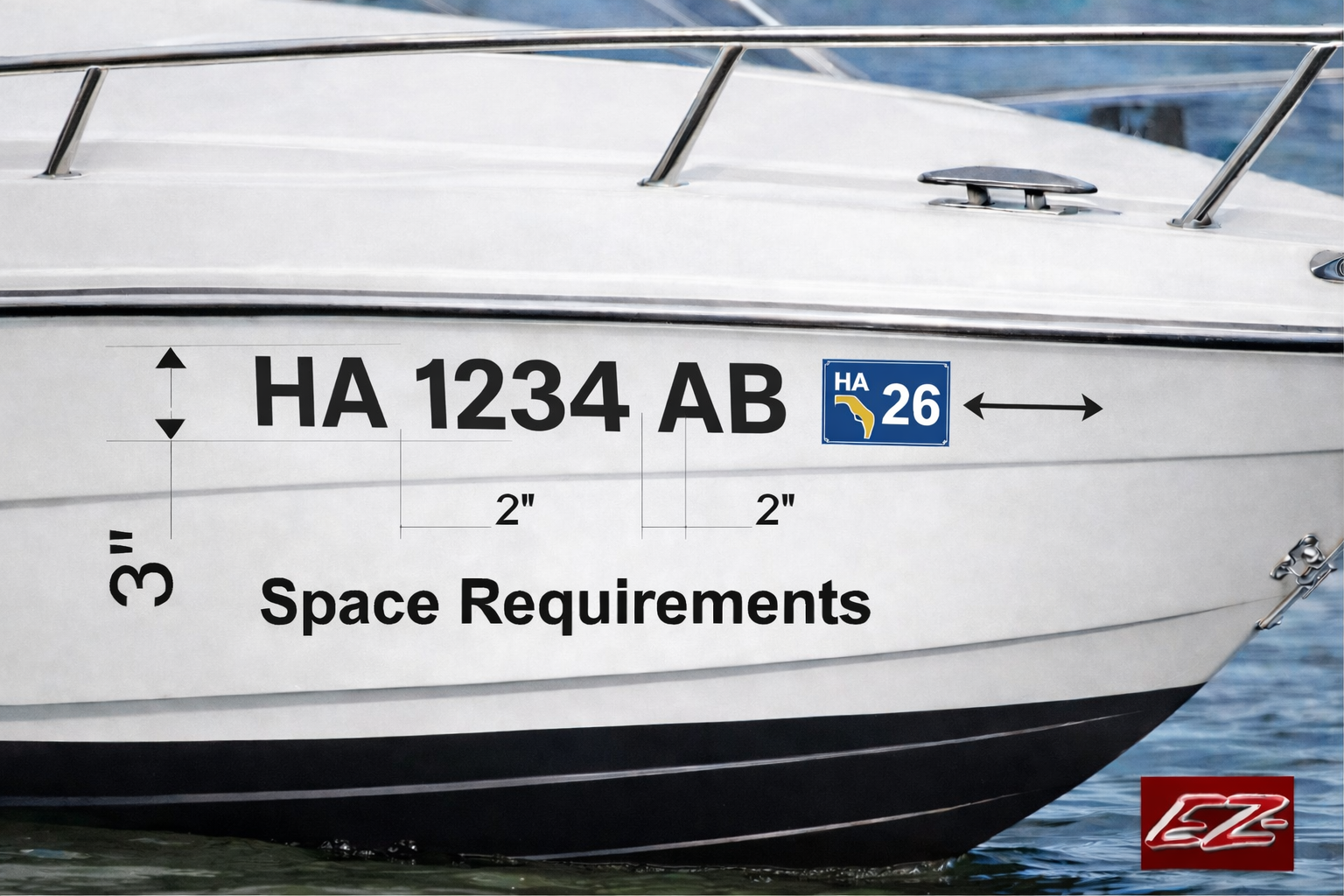
Hawaii boat registration numbers must be displayed correctly on your vessel so they are easy to read and properly spaced. Use the guide below, then design your boat number decals below.
Hawaii Display Requirements
Hawaii requires your registration numbers to be shown on both sides of the forward half (bow) of the boat. The numbers must be clearly visible, read from left to right, and use plain block characters at least 3 inches high in a color that contrasts with the hull.
Hawaii boat numbers are typically displayed as HI 1234 AB or HI-1234-AB. Separate the prefix, numbers, and suffix with a space or hyphen equal to the width of a letter (other than “I”) or a number (other than “1”).
Key Points
- Display numbers on both sides of the forward half of the boat
- Use block-style letters and numbers
- Characters must be at least 3 inches tall
- Color must contrast with the boat surface
- Letters and numbers must be easy to read
- Use spaces or hyphens between the groups
- Place any required validation or tax decals as your state specifies
- Keep the number clearly visible and legible on both sides
Always verify your final display matches current Hawaii requirements before installation.
Need To Upload Custom Boat Artwork?
Have a custom boat name, logo, or graphic you want quoted or reproduced? Upload your artwork here.
Upload Custom Boat ArtworkDesign Your Hawaii Boat Numbers Below
Choose your font, color, and style below, then preview your boat numbers instantly.
Boat Number Designer
Create Your Custom Boat Number
Enter your registration number, choose a font and color, then preview the finished design.

































































































Standard Colors "⇩Your Preview is BELOW ⇩"
Click On Color
- Red
- Ice Blue
- Silver Grey
- Soft Pink
- Burgundy
- Blue
- Dark Grey
- Pink
- Orange
- Cobalt Blue
- Gold
- Turquoise
- Lime Green
- Purple
- Yellow
- Mint
- Black
- Forest Green
- Dark Purple
- Grass Green
- Coffee Cream
- White
- Brown
- Flat Black
Metalic Flake colors
Add Metalic Flake colorsGradient Colors
Add gradient colors-
Shadow Color
- Red
- Ice Blue
- Silver Grey
- Soft Pink
- Burgundy
- Blue
- Dark Grey
- Pink
- Orange
- Cobalt Blue
- Gold
- Turquoise
- Lime Green
- Purple
- Yellow
- Mint
- Black
- Forest Green
- Dark Purple
- Grass Green
- Coffee Cream
- White
- Brown
- Flat Black
- CLICK BOX TO ADD SHADOW:
-
OR - CLICK BOX TO ADD OUTLINE:
- Upper Right:
- Upper Left :
- Lower Right:
- Lower Left :
- Shadow Width:
-
- Outline Width:
- + Increment - Decrement Adjust Letter Spacing